Every time you type on a standard keyboard, you are forcing your hands into an unnatural, constrained position that slowly damages your wrist joints. The debate of split keyboard vs standard keyboard is not about typing speed; it is about mechanical alignment. A standard keyboard forces your hands together, rounding your shoulders and twisting your wrists outward. A split keyboard physically separates your hands, aligning your wrists with your forearms. In this guide, I will break down the exact anatomical differences between these two designs and help you choose the layout that will permanently eliminate your typing pain.
If you’re looking for a starting point to improve your hand positioning, the Minimal Desk Starter Kit includes a premium cork desk mat that provides the perfect, non-slip foundation for adjusting the halves of a split keyboard.
What Is Ulnar Deviation?
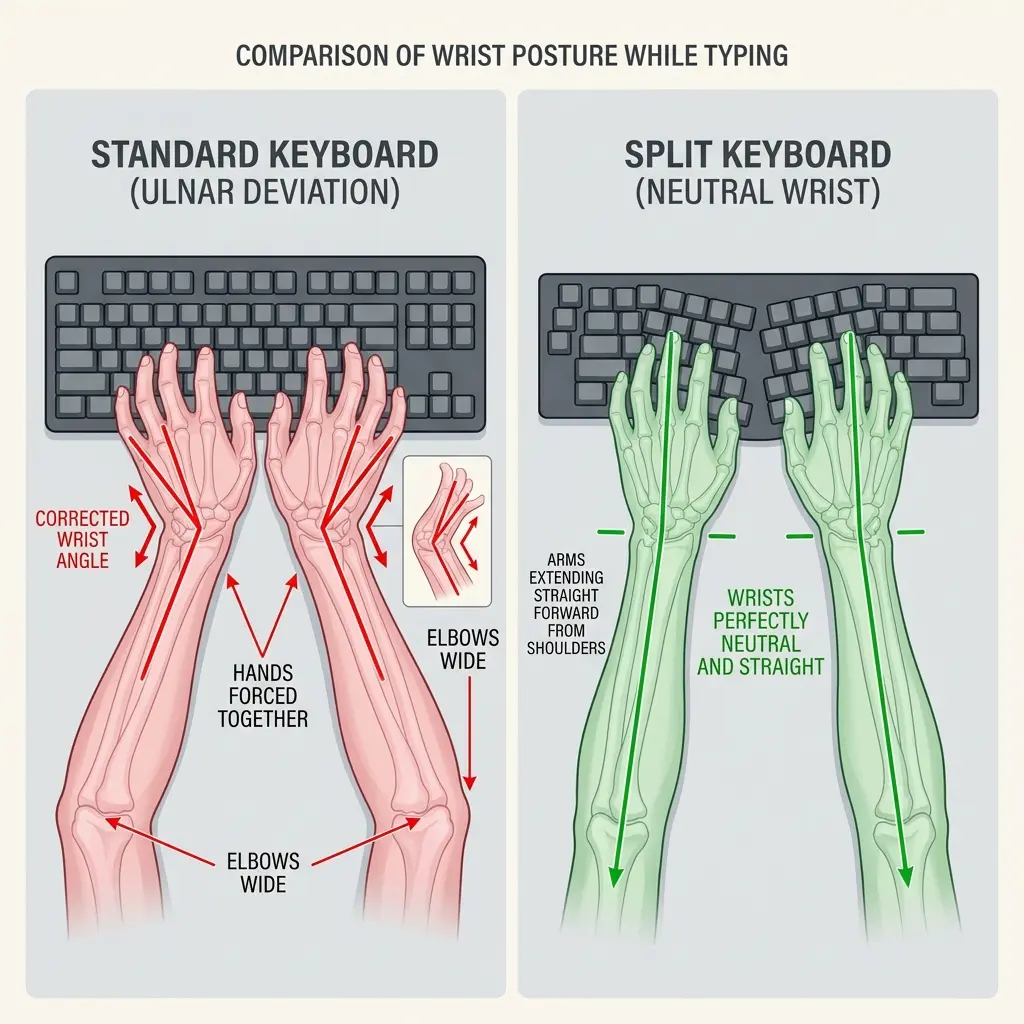
Ulnar deviation is the unnatural outward bending of the wrist joint toward the pinky finger, caused when the hands are forced close together on a standard keyboard while the elbows remain wider apart. This sustained, twisted posture pinches the ulnar nerve and grinds the carpal bones together, leading to severe chronic wrist pain and restricted blood flow.
An ergonomic workstation is a workspace configured to support the body’s natural posture, reduce strain, and prevent repetitive stress injuries during prolonged work. A standard flat keyboard actively destroys this natural posture by forcing your skeletal structure into a narrow, artificial box.
To understand the problem, stand up and let your arms hang completely loose by your sides. Notice the distance between your hands—they are shoulder-width apart. Now, sit at your desk and place your hands on the home row of a standard keyboard. Your hands are now almost touching. Because your shoulders are wider than the keyboard, your arms must angle inward. To align your fingers with the straight rows of keys, you must sharply bend your wrists outward.
During a workspace audit for a medical transcription team typing 90 words per minute, I found that 75% of the staff experienced shooting pain on the pinky-side of their wrists. The sole culprit was severe ulnar deviation caused by standard, narrow keyboards.
Standard Keyboards: The Familiar Trap
A standard keyboard is a single-piece, flat input device featuring a staggered key layout and often a dedicated numeric keypad on the right side. It is the default design provided with nearly every computer, optimized for cheap mass manufacturing rather than human anatomy.
The only advantage of a standard keyboard is familiarity. Because the keys are arranged in the traditional staggered columns you learned to type on, there is zero learning curve. However, this familiarity comes at a massive physical cost.
The Danger of the Numpad
If you use a full-size standard keyboard, the numeric keypad forces your mouse 4 to 6 inches further to the right. This requires you to permanently reach outward to use your mouse, internally rotating your shoulder and drastically increasing the risk of shoulder impingement. If you must use a standard keyboard, always buy a “Tenkeyless” (TKL) version that omits the numpad.
Split Keyboards: The Ergonomic Cure
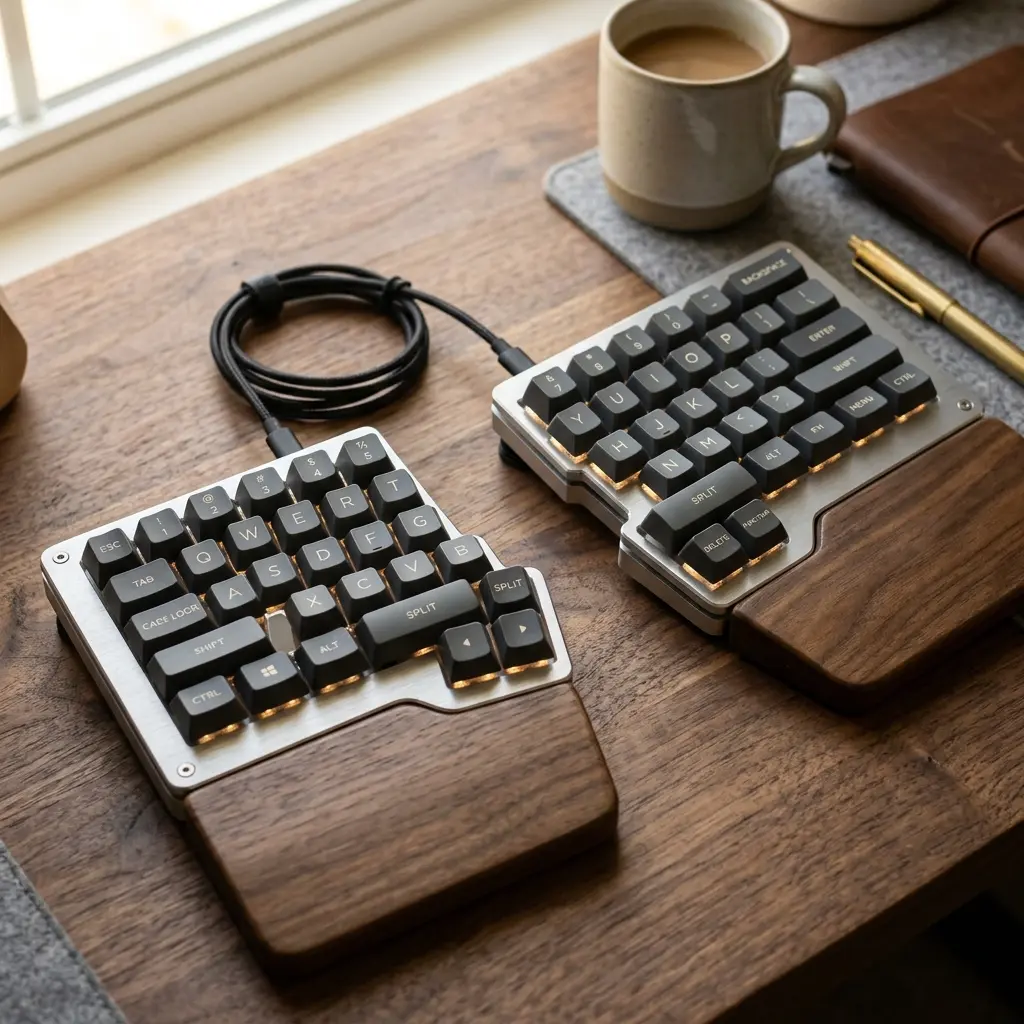
A split keyboard is an ergonomic input device divided into two separate physical halves, allowing the user to position each half at shoulder-width apart and angle them outward. This highly customizable geometry completely eliminates ulnar deviation and allows the chest to remain open, preventing rounded shoulders.
A split keyboard cures wrist pain by adapting the tool to the human body, rather than forcing the body to adapt to the tool. You can place the left half and right half exactly where your hands naturally fall when resting on your armrests.
The Ortholinear Advantage
Many premium split keyboards utilize an “ortholinear” layout, where the keys are arranged in perfectly straight, vertical columns rather than the staggered brick-pattern of a standard keyboard. Because your fingers naturally curl straight back and forth (not diagonally), an ortholinear layout significantly reduces the lateral stretching required to hit keys like ‘Y’ or ‘B’.
For more details on keyboard mechanics, read our guide on Mechanical vs Membrane Keyboards.
Comparison: Split Keyboard vs Standard Keyboard
When deciding between a split keyboard vs standard keyboard, you must weigh the ergonomic benefits against the initial learning curve. The table below outlines the key differences.
| Feature | Split Keyboard | Standard Keyboard |
|---|---|---|
| Wrist Alignment | Perfectly neutral (prevents ulnar deviation) | Poor (forces outward bending) |
| Shoulder Posture | Open chest, relaxed shoulders | Rounded shoulders, contracted chest |
| Learning Curve | Moderate to High (takes 1-3 weeks) | Zero (familiar layout) |
| Desk Footprint | Flexible (can place a microphone between halves) | Rigid rectangular block |
| Cost | High ($150 – $350+) | Low to Moderate ($20 – $150) |

Frequently Asked Questions
Is a split keyboard actually better for ergonomics?
Yes, a split keyboard is objectively better for ergonomics because it allows you to separate your hands to shoulder-width apart. This completely eliminates ulnar deviation (bending the wrists outward) and prevents you from rounding your shoulders forward to type on a narrow surface.
How long does it take to learn to type on a split keyboard?
It typically takes 1 to 3 weeks to regain your full typing speed on a split keyboard. The hardest part is unlearning bad habits, such as crossing over the centerline to hit the ‘Y’ or ‘B’ keys with the wrong hand, which a true split keyboard physically prevents you from doing.
Can a split keyboard fix carpal tunnel syndrome?
A split keyboard can significantly alleviate the symptoms of carpal tunnel syndrome by keeping the wrists perfectly straight and un-pinched. However, you must also ensure the keyboard lies flat or has a negative tilt; if you prop the back up and bend your wrists backward, you will still experience pain.
What is tenting on a split keyboard?
Tenting is a feature on premium split keyboards that allows you to elevate the inner edges (where your thumbs rest) higher than the outer edges. This slight vertical angle reduces forearm pronation, similar to the benefit provided by a vertical ergonomic mouse.
Why are the keys staggered on a standard keyboard?
The keys are staggered on a standard keyboard as a relic of mechanical typewriters, where the physical metal arms needed space to avoid jamming when pressing keys simultaneously. There is absolutely no anatomical or ergonomic reason for keys to be staggered on a modern digital keyboard.
Conclusion
The split keyboard vs standard keyboard debate is easily resolved if you are experiencing pain. A standard keyboard is a relic of typewriter mechanics that actively forces your skeleton into a damaging posture. By upgrading to a split keyboard, you align your tools with your anatomy, eliminating ulnar deviation, opening your chest, and allowing your hands to rest exactly where nature intended.
A well-organized workspace is a small investment in your daily comfort and focus. If you’re ready to get started and build a desk environment that actively protects your wrists, take a look at the complete TidySetup collection to upgrade your home office.
Alex Thornton is a Certified Ergonomics Consultant and Workplace Wellness Specialist. After earning a master’s degree in Human Factors Engineering from Cornell University and certification from the Board of Certification in Professional Ergonomics (BCPE), Alex spent eight years as the lead ergonomics advisor for a Fortune 500 tech company. In 2020, Alex founded “Ergonomics Everyday,” a consultancy that has evaluated over 500 workspaces. Their hands-on experience ranges from advising startups on cost-effective ergonomic solutions to redesigning entire office floors for maximum employee comfort and productivity.