








Adhesive cable channels peeling off the underside of your desk under the weight of heavy charging bricks is a frustrating point of failure for many workspace builds. The solution is understanding the structural differences in cable trays vs raceway channels, selecting heavy-duty open steel trays for bulky power transformers and reserve raceways for clean vertical drop lines. In this guide, I will share the load capacities, thermal airflow data, and mounting methods I use across professional spatial overhauls to help you choose the right cable infrastructure for your workstation.
If you want a complete cable-free workstation foundation equipped with heavy-gauge steel trays and articulating monitor mounts, explore the Advanced Desk Setup Kit.
What Is the Difference Between a Cable Tray and a Raceway Channel?
An under-desk cable tray is an open wire-mesh or sheet-metal basket mounted beneath the desktop designed to hold heavy power bricks, multi-outlet surge protectors, and excess coiled wiring. A raceway channel is a narrow, enclosed plastic or aluminum duct with an adhesive backing designed strictly for guiding thin, singular cables along flat surfaces or desk legs.
A cable management system is a combination of tools such as clips, sleeves, and trays used to organize and conceal wires in a workspace.
While adhesive raceway channels excel at concealing single wall cables behind baseboards, they fail when deployed as primary under-desk hubs because modern computing requires managing substantial physical bulk:
- Oversized AC Power Adapters: High-performance laptops (e.g., 96W–140W USB-C bricks) measure 1.5 to 2.5 inches thick and weigh up to 1.2 pounds—far too bulky for enclosed 1-inch raceways.
- Thermal Dissipation: Enclosed plastic raceways trap the ambient heat emitted by fast chargers and power strips. In accordance with guidelines from the Electrical Safety Foundation International (ESFI), power supplies and surge strips require unobstructed airflow to prevent heat accumulation and cord insulation degradation.
- Payload Weight: A fully equipped workstation power strip with 4 connected transformers weighs between 4 and 8 pounds, quickly shearing standard foam adhesive strips.
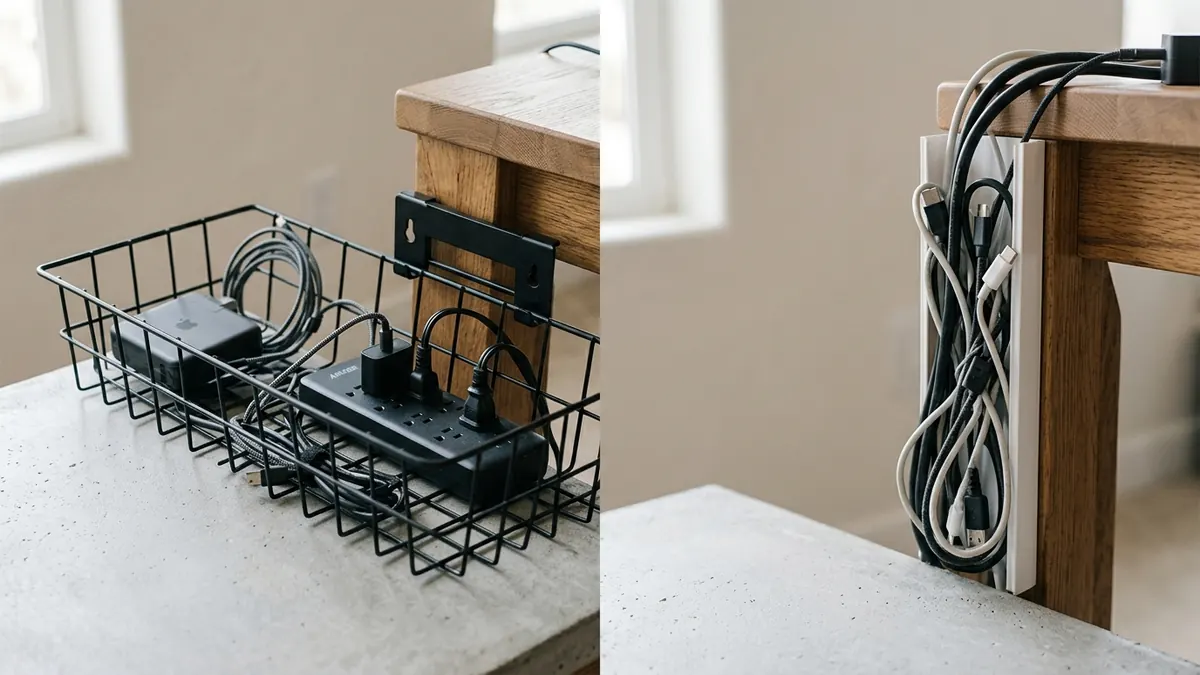
Why Do Adhesive Raceway Channels Frequently Fail Under Desks?
Adhesive raceway channels frequently fail under desks because synthetic foam adhesives lose shear bond strength over time under continuous vertical gravitational loading, combined with the radiant heat emitted by resting transformers. Once adhesive tape reaches 95°F (35°C), its peel resistance drops by up to 60%, causing channels to drop suddenly onto users’ feet.
An under-desk cable tray mounted with heavy-duty steel clamps or threaded screws supports payloads up to 15 pounds without relying on temporary adhesives.
In over 400 workspace evaluations, I have seen hundreds of collapsed adhesive raceways that peeled off unfinished particleboard or veneer desk undersides. In contrast, the Under-Desk Cable Management Tray utilizes structural carbon steel wire with reinforced screw mounts or padded desk clamps that securely support up to 15 pounds (6.8 kg) of heavy power gear indefinitely.
Review additional structural hiding tactics in our guide on under-desk cable management hiding strategies.
Comprehensive Comparison: Steel Cable Trays vs. Plastic Raceways
Comparing performance across structural payload, thermal dissipation, and accessibility highlights why steel wire trays remain the commercial standard for workstation cable architecture:
| Performance Attribute | Open Steel Wire Cable Tray | Enclosed Plastic Raceway Channel | Engineering Implication |
|---|---|---|---|
| Payload Capacity | 10 to 15+ lbs (4.5–6.8 kg) | 1 to 2 lbs max (0.5–0.9 kg) | Trays safely hold power strips + multiple heavy bricks |
| Thermal Management | 360° ambient airflow convection | Trapped heat in enclosed cavity | Trays keep chargers operating within safe temperature limits |
| Cable Reconfiguration | Instant drop-in pass-through | Requires prying off snapped lids | Swap peripherals in seconds without re-taping |
| Mounting Mechanism | Threaded wood screws or non-invasive clamps | Double-sided foam adhesive tape | Permanent structural hold vs. high failure rate tape |
| Ideal Workspace Location | Under-desk center infrastructure hub | Vertical desk leg drop line or baseboard run | Complementary tools when used in proper zones |
For more material comparisons, check our article on cable raceways vs. cable sleeves for under-desk routing.
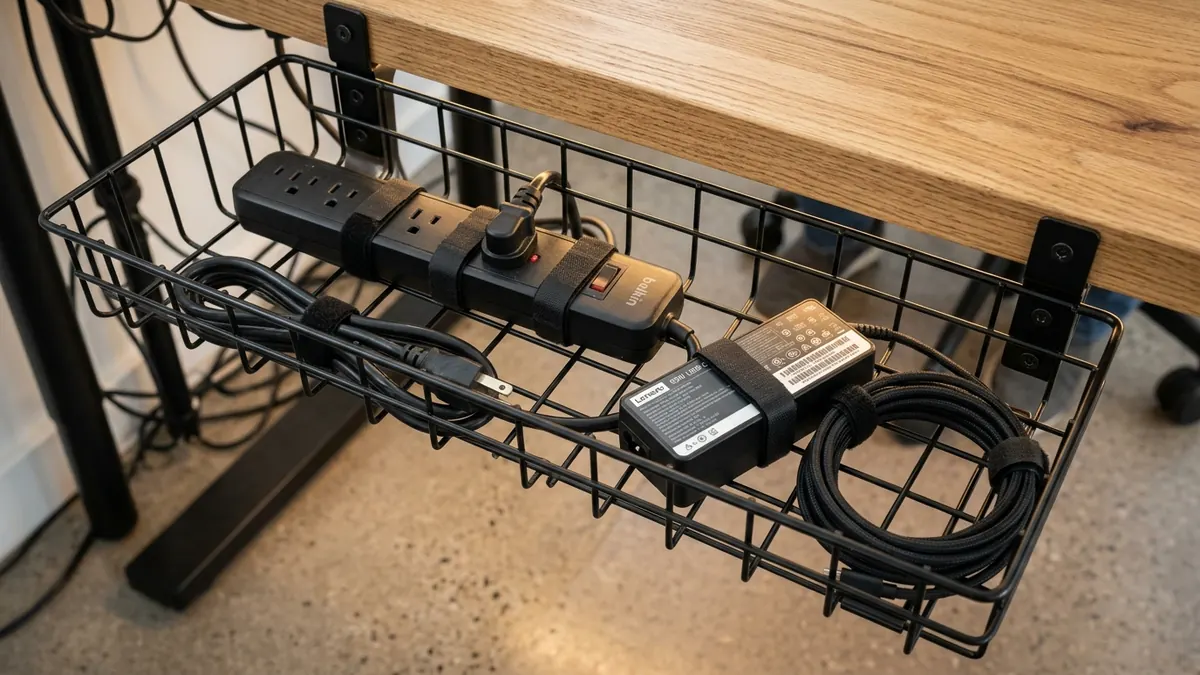
How to Combine Both Tools for the Ultimate Hybrid Wire Architecture
The most elegant and durable workstation cable setups do not treat trays and raceways as competing options—they use both in a synchronized hybrid design. Use an open steel tray beneath the desk plane as the central power hub, and use a vertical magnetic or adhesive raceway channel down the rear desk leg to conceal the single master power drop.
Here is how to deploy the hybrid model:
- Step 1: The Core Tray Hub: Mount your Under-Desk Cable Tray centered beneath the rear edge of the desk. House all surge protectors, docking stations, and display power supplies inside.
- Step 2: Articulating Arm Channels: Route monitor cords down through the internal tracks of your Full-Motion Single Monitor Arm directly into the tray.
- Step 3: Leg Raceway Spine: Attach a vertical raceway channel or flexible cable spine to the inside of the rear desk leg. Route only the single master power strip cord down through this channel into the wall socket.
Discover complete system blueprints in our anchor guide on desk cable architecture principles.
Step-by-Step Guide: Installing an Under-Desk Steel Cable Tray
Follow these four simple steps to install an under-desk cable tray securely in under 15 minutes:
- Step 1: Mark Mounting Location: Position the tray 3 to 5 inches forward of the rear desk edge. This ensures cords can drop cleanly into the tray without bumping against the wall.
- Step 2: Pre-Drill or Clamp: If using a clamp-on model, tighten the padded thumb screws securely to the desktop edge. If using screw mounts, pre-drill 1/8-inch pilot holes (ensuring screw depth does not exceed 3/4 of desk thickness).
- Step 3: Secure the Surge Protector: Place your surge protector into the tray and secure it with hook-and-loop straps to prevent sliding when cords are plugged in.
- Step 4: Load and Strapping: Plug in your power transformers and coil excess cord lengths neatly within the tray basket using reusable fabric ties.

Frequently Asked Questions
Are under-desk cable trays better than raceway channels?
Yes, for under-desk use. Under-desk cable trays handle significantly higher weight payloads (up to 15 lbs), fit oversized laptop chargers, and provide open ventilation to prevent heat buildup, whereas raceways are limited to thin single cords.
Can adhesive raceways hold laptop power bricks?
No. Standard adhesive raceways are only 1 to 1.5 inches wide and cannot physically accommodate standard 65W–140W laptop power bricks. Furthermore, the combined weight and heat will quickly cause the adhesive tape to fail.
Will mounting an under-desk tray damage my desk?
Clamp-on under-desk cable trays feature soft rubber or silicone padding and require zero drilling, preventing any scratches or cosmetic damage to your desktop. Screw-mounted trays only leave small pilot holes on the unfinished underside.
How do I stop cables from tangling inside a wire tray?
Use reusable hook-and-loop fabric straps to bundle excess wire lengths into neat 6-inch figure-eight coils before placing them into the tray. Avoid bundling high-voltage power lines tightly with unshielded audio cords to prevent signal interference.
What size under-desk cable tray do I need?
For a standard single or dual-monitor workstation, a tray measuring 16 to 24 inches long and 4 to 5 inches deep provides ample room for a 6-outlet surge protector, 2 laptop chargers, and monitor power bricks.
Can I use both cable trays and raceways on the same desk?
Yes. A hybrid approach works best: use an under-desk steel tray as the central power hub beneath the desk surface, and use an adhesive or magnetic raceway along the rear desk leg to conceal the single master power drop cord.